Gemini API Computer Use reaches GA across two APIs

Google made the Gemini API Computer Use tool generally available on October 30 across both the Interactions and GenerateContent APIs. The change is a tool availability milestone, not a new Gemini model or a claim that an API request can operate a computer without an application around it.
The dated official release note establishes the two supported API routes. Computer Use existed before this announcement. Developers evaluating an older preview should distinguish the tool’s new GA status from the versions, defaults and examples in a particular client repository.
What your application still has to do
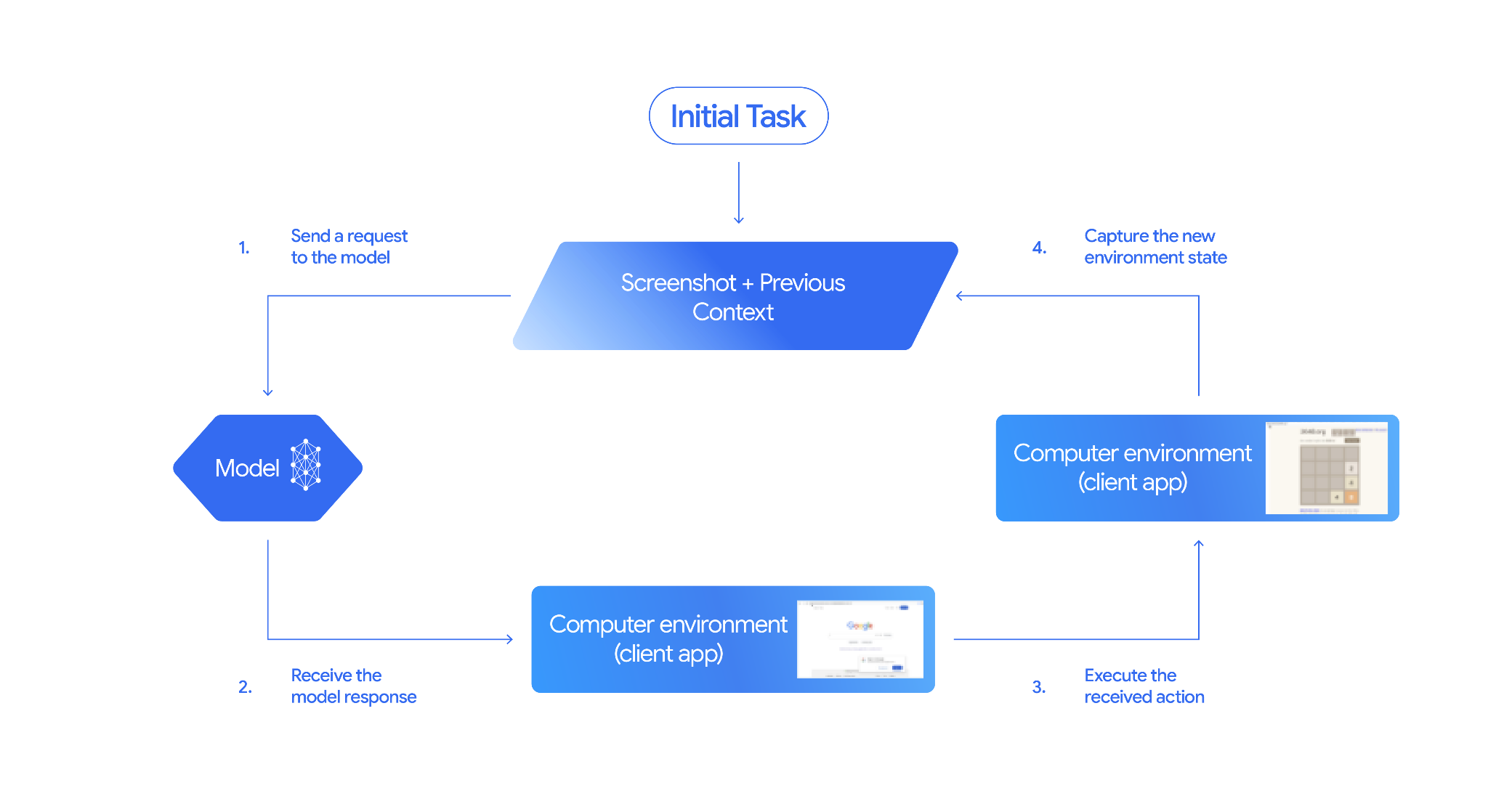
Google’s current guide describes a screenshot-and-action loop: the model proposes a UI action, the client executes it, and a new screenshot informs the next step. Browser, mobile and desktop environments are supported. This is client-side execution, not a hosted computer bundled into every request.
| Layer | Current scope | Integration question |
|---|---|---|
| API route | Interactions or GenerateContent | Which route does the existing application use? |
| Models listed in the guide | Gemini 4 Argon, 3.8 Flash, 3.5 Flash-Lite, 3 Flash Preview | Google recommends 3.8 Flash for computer use |
| Execution | Client handles actions and screenshots | Where will the browser or desktop run? |
The guide includes action intents, safety decisions and opt-in screenshot prompt-injection detection. It recommends isolation and supervision, and warns against critical decisions or sensitive tasks where errors cannot be corrected. A GA label does not remove those limitations.
The reference implementation is a starting point
Google links an official reference repository whose name still includes preview. Its README offers local Chrome through Playwright or a Browserbase backend, with configuration for the Gemini Developer API or Vertex AI. The command-line options include a starting URL, model selection and a cursor highlight for visual debugging.
One useful warning in that README concerns operating-system-rendered select menus. Some Playwright environments cannot capture those menus in the screenshot supplied to the model. A page looking normal to a person therefore does not establish that the agent has received the same information.
The repository’s documented default is Gemini 3.6 Flash. Treat that mismatch as a reason to check the current model and API documentation before adopting an example unchanged. ByteForward has not installed or run this implementation.
A practical evaluation should separate three checks
First, confirm that the chosen API route and model match the current documentation. Second, inspect the client’s actual screenshots and action results on a harmless task. Third, review how that application pauses, rejects actions and recovers from mistakes. Success at one layer does not demonstrate the other two.
For example, a test that opens a page and reads a heading is different from one that changes an account record. Keep the first evaluation narrow enough to identify whether a failure came from the model, a missing screenshot detail or the surrounding application. This is an evaluation suggestion, not a benchmark result.
Featured image: ByteForward editorial illustration using Gemini’s official brand reference. The cursor and monitor are conceptual, not a product screenshot.