ChatGPT brings account switching to iOS and Android

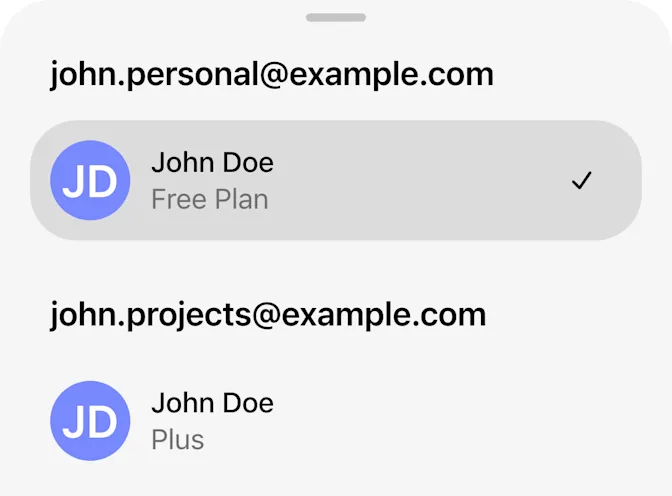
OpenAI is rolling out account switching in the ChatGPT iOS and Android apps, according to its October 30 release notes. Two accounts can remain signed in, with one active at a time. The feature removes a repeated sign-out step. It does not turn separate subscriptions into a shared plan.
For people moving between personal and work use, the practical benefit is less login friction. Account separation still matters.
How to add a second account
Open Settings, choose Switch account, then Add account and sign in. Return to Switch account to select the other login. When two accounts are already signed in, Add account disappears until one is logged out.
Missing the option can mean the rollout has not reached you. The guide specifies all plan types for web switching, but leaves mobile plan eligibility unspecified.
Three distinctions to keep clear
| Action | Result |
|---|---|
| Switch account | Changes account, without merging data |
| Switch workspace | Changes workspace within one account |
| Open another account’s notification | Selects that account and opens its content |
Mobile alerts can come from either signed-in account, subject to notification settings and device permissions. That makes the active-account indicator worth checking after following an alert.
A paid subscription stays with its owner
OpenAI’s subscription troubleshooting guidance explains that a mobile purchase is linked to both the store account used for billing and the ChatGPT account associated with that purchase. The email on an Apple or Google receipt may differ from the ChatGPT login.
If the app shows Free after switching, first return to the account that made the purchase. Use its original sign-in method. Buying again before checking can create duplicate charges, and reinstalling the app does not change subscription ownership.
For an existing Apple purchase, restoration must use the original ChatGPT account and the Apple Account that paid. If Google Play shows an active subscription but the original ChatGPT account still shows Free, OpenAI advises contacting Support before buying again. The switcher is a convenience feature, not a subscription-transfer tool.
Work policies still follow the managed account
The managed-account notice says organizational controls continue to apply to work data. Depending on configuration and applicable law, administrators may have access to prompts, files, outputs and activity information. They can also restrict available features.
Using a personal account alongside a managed one does not move work chats or files into the personal account. For work that must remain under organizational governance, use the managed account. For personal activity, verify that the selected account is actually personal and not organization-managed.
For example, a work notification can interrupt personal planning. Check the active account before the next upload. This is an illustrative precaution, not a test result.
ByteForward reviewed OpenAI’s release notes and support documentation. We have not independently tested the mobile rollout.
Featured image: AI-generated editorial illustration by ByteForward. The phone and account tokens are a visual metaphor, not a product screenshot. OpenAI wordmark: OpenAI.