Gemini 4 Argon reaches paid Pro users in Antigravity

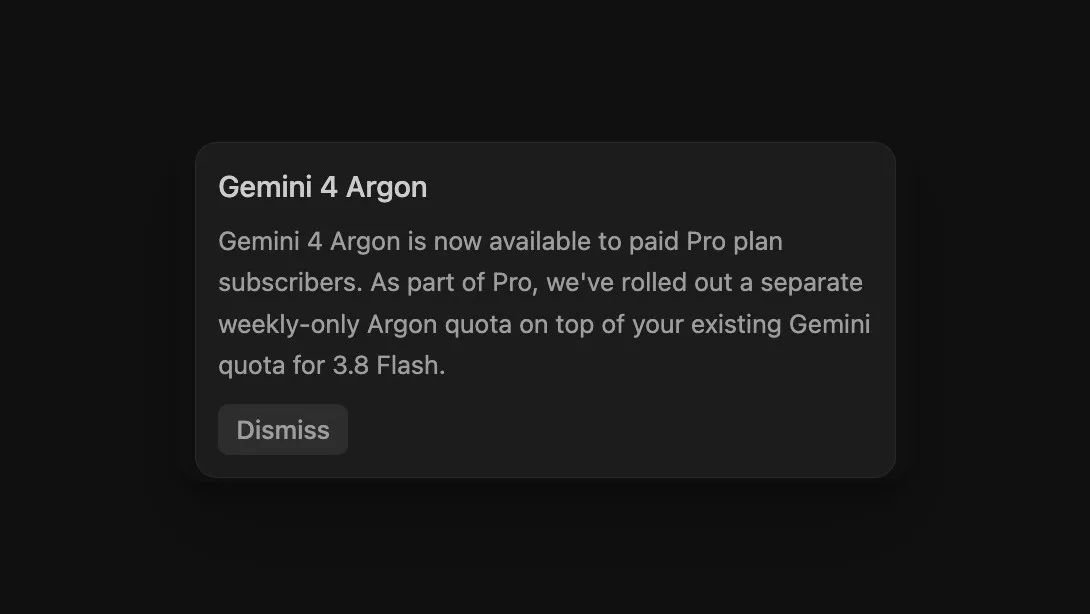
Paid Google AI Pro subscribers can now use Gemini 4 Argon in Antigravity. Google’s current model documentation confirms eligibility for Pro subscriptions outside a trial period. The rollout notice supplied to ByteForward adds an important detail about usage. Argon gets its own weekly allowance alongside the existing Gemini 3.8 Flash quota.
This expands the options available to Pro subscribers doing coding and agent work. Our October 13 API launch coverage described Antigravity access for Ultra subscribers. The new Pro access deserves a separate look because the subscription rules and the allowance determine how useful it will be.
Paid Pro eligibility has a trial restriction
Trial Pro subscriptions are excluded. That makes billing status worth checking even when an account carries a Pro label. Google’s table also lists Argon for Ultra and Enterprise accounts.
The documentation links an upgrade request form for switching from trial to paid Pro. Before changing plans, check what happens to any remaining promotional period.
The Antigravity app and IDE are different products
Argon is listed for the Antigravity App, Antigravity CLI and IDE extensions. Google explicitly excludes the standalone Antigravity IDE. That distinction matters if a paid subscriber opens an editor and cannot find the model. Having the right plan does not make Argon available on every product carrying the Antigravity name.
Argon has a separate weekly allowance
The featured screenshot shows a notice describing an additional Argon allowance that refreshes weekly and sits alongside the existing Gemini allowance for 3.8 Flash. That arrangement gives Pro users two distinct pools to watch. A remaining Flash balance should not be read as the amount of Argon work still available.
Google’s general plans page describes Pro usage that refreshes every five hours until a weekly ceiling is reached. The more specific Argon notice says its allowance is weekly only. Subscribers should not assume that waiting five hours will replenish this Argon pool.
Neither the supplied notice nor the reviewed plans page gives a fixed number of Argon prompts or tokens per week. Google says baseline consumption depends on the work an agent performs and that limits can change with capacity. Access alone cannot tell a developer how many large tasks will fit into a week.
Check the quota before a long task
In the CLI, type /usage or its alias /quota to open the quota panel. Google’s command documentation says opening it refreshes the model configuration and quota status from the backend. The panel supports scrolling, which matters when a relevant model entry is outside the visible area.
A useful first check is to record the displayed Argon allowance, run a contained task and inspect it again. Pick work with a clear result, such as a small change with an existing test. This is a suggested evaluation method. The announcement alone cannot establish how quickly your work will consume the allowance.
Finally, review the general AI Credit Overages setting. Google’s plans page describes Never as waiting for a baseline refresh and Always as allowing eligible credits to be used after exhaustion. The Argon notice does not separately explain overage eligibility for its new pool. Check the account’s current credit options before assuming work will continue after the weekly allowance runs out.
What this changes for Pro subscribers
The immediate benefit is a chance to try Argon in a coding workflow without moving to Ultra solely for access. The open question is how far the included allowance goes for a particular project. Keep the first test small enough to review, watch the separate balance and judge the finished work before treating Argon as an everyday default.