Copilot Projects and shared automations give team work a new home


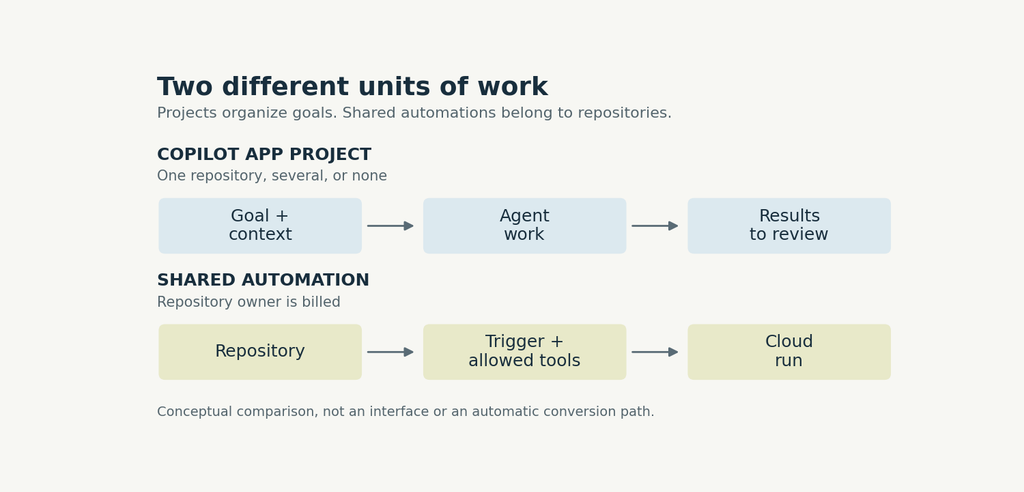
GitHub’s October 28 Copilot app update introduces Projects in public preview, giving ongoing work a home across repositories, sessions and results. A project can also work without a repository. The change is about coordinating a broader goal, rather than starting another isolated coding chat.
A project starts with the outcome, not a repository
The Projects guide lists the app as available across Copilot plans. You can add repositories, upload files or folders to Library and describe the result you want. The Overview groups work into Needs input, Open, Working and Done, with individual sessions available for review or further direction.
A useful example is investigating feedback about a search feature. Supply the specification and feedback file, ask for themes grounded only in that material, and prohibit code changes during the investigation. After reviewing the findings, ask for a recurring summary and check its schedule in Automations. This illustrates the documented workflow, not a test we performed.
Projects can coordinate agents and recurring work, but their public-preview status matters. The same announcement discusses desktop computer use, which is not a new October 28 launch. Our earlier computer-use and dynamic-workflows coverage explains that separate October 1 capability.
Shared automations change ownership and billing
The shared Copilot Automations rollout addresses a different problem: a team workflow should not depend on its creator staying in the organization. Shared automations belong to a repository, act as Copilot on GitHub and bill AI credits to the repository owner. Readers can see them and writers can edit them.
| Before creating one | What to check |
|---|---|
| Plan | Rolling out to Pro, Pro+, Max, Business and Enterprise |
| Repository | Write access is needed to create |
| Organization policy | Cloud agent billing to the organization must be allowed |
| Automation type | Choose Shared at creation. Type cannot be changed later |
Availability can vary during rollout. GitHub’s examples include reproducing a bug when an issue opens and taking screenshots when a pull request becomes ready. Those examples are useful starting points, not evidence that every repository should enable autonomous changes immediately.
Included access is not included AI usage
A separate Enterprise announcement makes Copilot access available to eligible GitHub Enterprise Cloud customers working with an account team. Self-serve customers cannot switch yet. Copilot access has no included monthly AI credits, so metered usage is charged from the first request. Existing Business and Enterprise plans remain available.
The transition guide says switching is voluntary and owners must still assign seats. Enterprise Cloud license holders have no additional Copilot seat charge, while Copilot Standalone costs $10 per user monthly for other users. The billing model applies across the enterprise and cannot be mixed with Business or Enterprise seats in that enterprise.
Start with a workflow you can inspect
For an initial trial, separate information gathering from changes. A feedback summary gives you a result to compare against known source material before you let the same project propose edits. For a shared automation, decide who reviews its output and who owns its costs before making it routine.
That distinction keeps three decisions separate: how work is organized, which actions it can take and which account pays. Projects and shared automations connect those decisions, but they do not remove the need to make them.