Gemini 4 Argon comes to Freebuff with daily promotional access

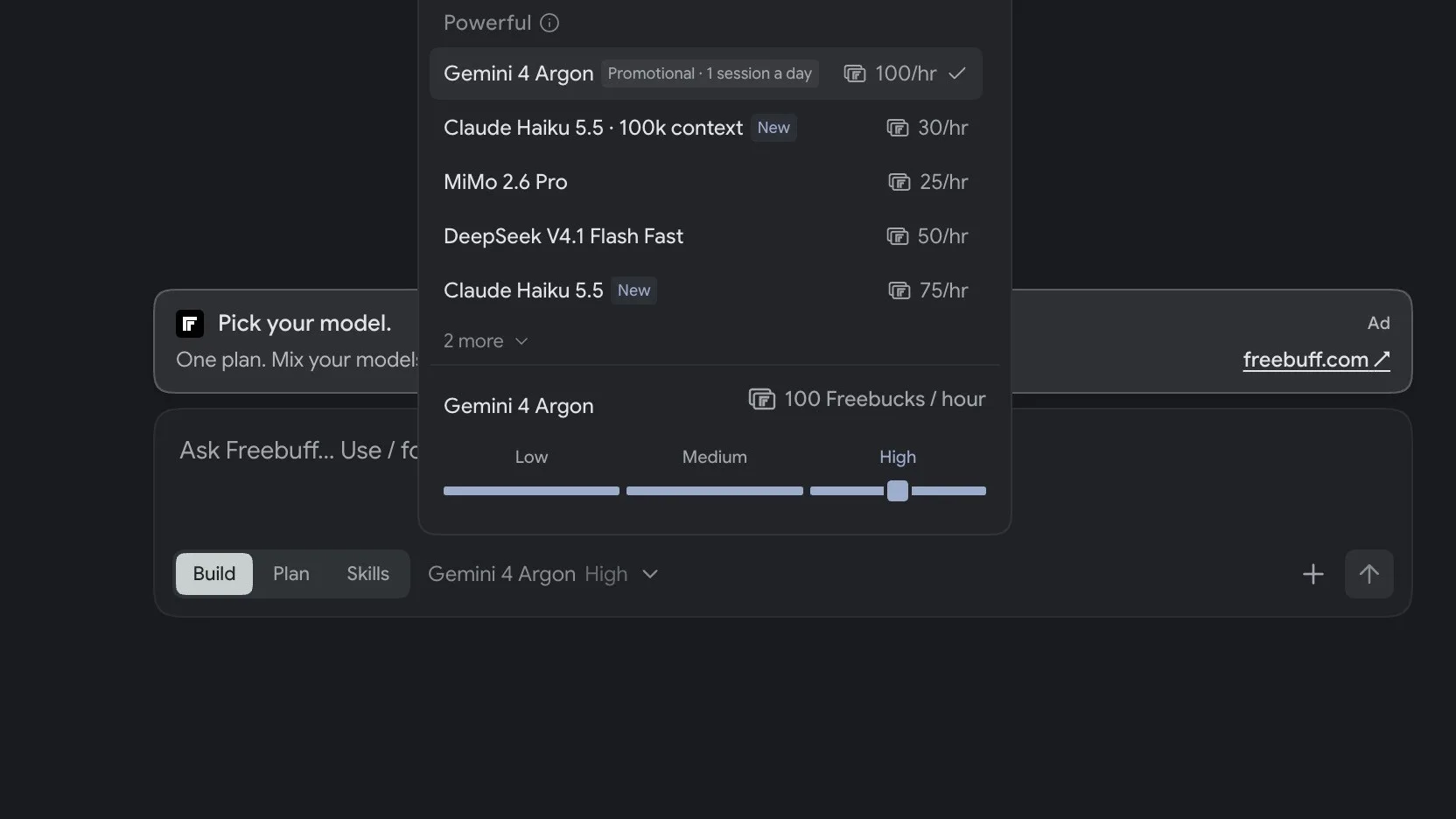
Gemini 4 Argon is now available in Freebuff, as checked on October 14, 2026. The service lists Google’s reasoning model as a promotional option, with a daily session cap and access rules that depend on where you use it.
This article contains an affiliate link. ByteForward may receive a referral reward when you use it.
What the promotion includes
Freebuff’s current plans list Argon among the promotional models. Its model picker shows a rate of 100 Freebucks per hour and a limit of one session a day. The promotion is advertised as free in the US, with a paid plan required elsewhere. The daily session cap applies to every plan.
Freebucks are the service’s usage allowance. An Argon session consumes 100 of those units from the available balance. Freebuff defines sessions as one hour, and unused daily allowance does not carry over after the reset at local midnight. Check the allowance in your signed in account before starting.
These are promotional terms and can change. Freebuff also applies fair use limits, so a session can pause or stop even when allowance remains. No promotion end date was stated in the terms we checked on October 14, 2026.
The model and its reasoning controls
Google’s model documentation positions Argon for complex software engineering and mathematical and scientific reasoning. Google announced broader availability on October 13. Our earlier Gemini 4 Argon coverage provides more background on the model.
Freebuff’s picker exposes Low, Medium and High reasoning settings. The screen shown with this article has High selected. These controls are visible in Freebuff, but Google’s API specifications alone do not establish the tools or token limits available through this service.
How to start a session
- Open Freebuff and sign in.
- Open the model picker and select Gemini 4 Argon.
- Check the displayed Freebucks rate, remaining allowance and promotional session limit.
- Choose the reasoning level and submit a focused task.
A practical first test
Start with a small task whose result you can check. For a bug, provide the failing behavior, the relevant code and a reproducible test. Ask for a diagnosis, a minimal fix and a regression test. For a new feature, give clear acceptance criteria and ask for a plan before implementation.
Review any patch and run the relevant tests before relying on the result. To compare Argon with another available model, use the same task and inputs, then check whether each result meets those criteria. This gives you a useful basis for choosing a model for your own work.